List the parts on your shelf in minutes.
Take a photo of the part; the part name, part number and compatible vehicles go into a draft. You add the condition and price, then approve. Customers call you directly or message you on WhatsApp.
Your first 20 listings are free, no card required.
Plans
Live in three steps
-
Add your business
Sign up with your phone number and upload your tax certificate. Our team checks your document and verifies your business.
-
Photograph your parts
Use the Capture screen in the app to photograph the parts on your shelf one after another. Drafts go to the approval queue.
-
Approve and publish
Enter the condition and price, then approve. The listing appears in search, on your storefront and in the app.
Why CepParça
No commission, no middleman
We take no cut of your sales; there is no payment or shipping through us. Customers call or message you, and you handle the negotiation. You only pay a plan fee for listing and for the listing software.
Every promise here runs as a rule in the system; we do not make promises we have not built.
- No commission on sales Customers call you directly or message you on WhatsApp; you handle the negotiation and we take no cut of the sale.
- From photo to listing in minutes You take a photo of the part; the name, part number and compatible vehicles go into a draft. No listing goes live until you approve it.
- First 50 listings free The Starter plan requires no card; you pick a plan as your business grows.
- Work with your team Add your staff with a 6-digit invite code; the activity log shows who added which part.
- Know how much interest you get Daily counts of parts added, views, calls and WhatsApp messages, plus parts customers search for but rarely find.
- Verified business badge You are verified with your tax certificate and address, so customers see a trustworthy storefront.
- Reply to reviews Write public replies to reviews from real customers on your storefront.
- Clear prices, labeled ads Plan and ad prices are public and include VAT. Every paid placement is labeled "Sponsored"; an ad that has not started is fully refunded.
Screens from the app
Screens were taken from the business app with a demo account. Names, prices and numbers are sample data; part photos are representative.
How bench mode works
The phone stays fixed on a stand; you bring parts in front of the camera one by one and a card appears on the right for each part. At the end you enter prices in one list.
- The bench is full. Every part is waiting to be listed.
- Fix the phone on a stand and open Bench mode.
- Bring the part into the frame and hold it still. A card appears on the right; a part it is sure of is added on its own, otherwise it asks.
- Next part, next card. The photo is taken on its own.
- If the phone slips, capture pauses. Fix it again and carry on.
- Each new part uses 1 listing credit.
- Objects that are not vehicle parts, like a pen, do not become listings or use credits. Remove a wrongly recognised part with Delete; the credit comes back within the monthly limit.
- Tap Finish and enter prices in one list. Listings go live and customers with a part alert are notified.
- When you are ready, fix the phone in place and start.
-
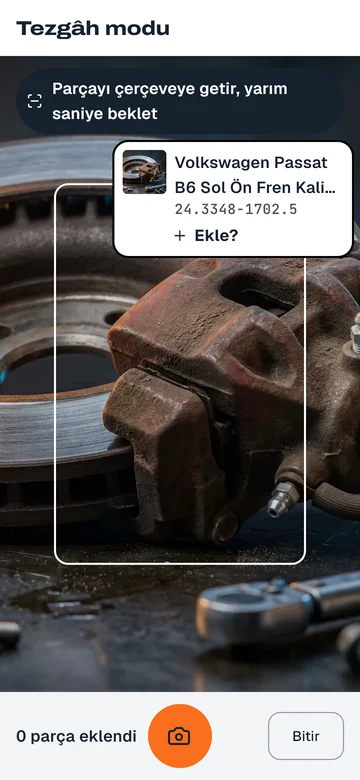
Counter mode Hold the part to the camera; the system reads the part and its number, and you add it with one tap. Sample screen · sample data · Representative photo -
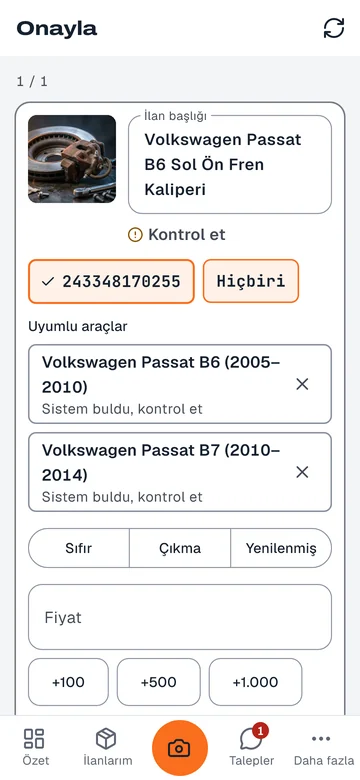
Approve Title, part number and compatible vehicles arrive as suggestions; you check them and choose condition and price. Sample screen · sample data · Representative photo -
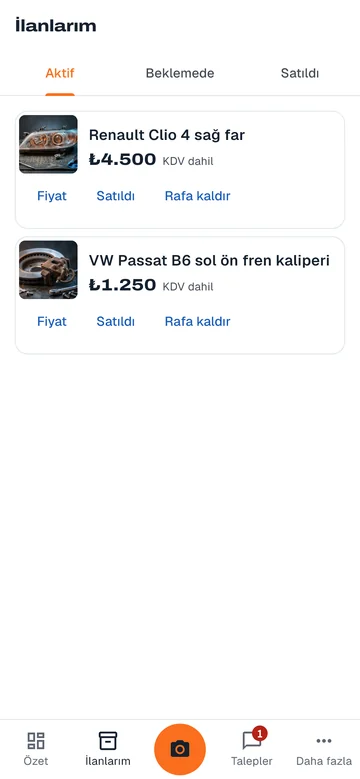
My listings Change the price of a live part, mark it sold or take it off the shelf. Sample screen · sample data · Representative photo -
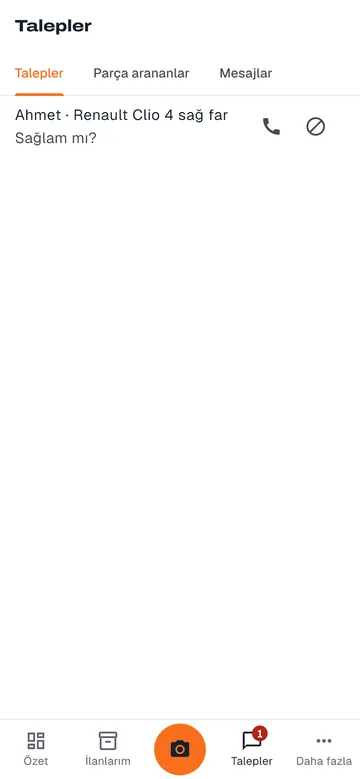
Requests Customer questions, part searches and messages in one tab; call back without leaving the counter. Sample screen · sample data
Features that speed up your work
- Listings from photos Take a photo of the part; its name, part number and compatible vehicles go into a draft. How it works
- Bulk upload Add hundreds of parts at once with an Excel (CSV) file or bulk photos. How it works
- Stock sync Prices and stock from your XML, CSV or JSON feed flow into your listings automatically. How it works
- Team and invite codes Your staff join with an invite code; you see who added which listing. How it works
- Analytics Views, calls and WhatsApp counts; daily parts added and parts in demand. How it works
- Requests and messages Listing requests, part seekers and messages in one place; notifications keep you informed. How it works
- Storefront page Your logo, hours, gallery and all your listings at your own address, with a verified seal. How it works
- Review replies Reply publicly to reviews from real customers on your storefront. How it works
Stand out with ads if you want
Ads are optional, paid once and always labeled. Organic ranking is not for sale.
Plans
The number in a plan is how many listings can be live at the same time. Fit the plan to your work with extra users and extra listings; the VAT-inclusive total is calculated instantly.
-
Starter
Listings: 20
Free
- Staff accounts (including owner): 1
- Daily photo listing rate: 50
-
Shop
Listings: 1,000
₺3,990 / mo
- Total for 6-month billing: ₺22,740 (₺3,790 per month)
- Total for annual billing: ₺43,890
- 6 months: save 5%
- Annual: 1 month free
- Staff accounts (including owner): 3
- Daily photo listing rate: 1,000
- Logo and cover image on your storefront
- Bulk photo upload on the web
-
Pro
Listings: 5,000
₺11,990 / mo
- Total for 6-month billing: ₺68,340 (₺11,390 per month)
- Total for annual billing: ₺131,890
- 6 months: save 5%
- Annual: 1 month free
- Staff accounts (including owner): 8
- Daily photo listing rate: 5,000
- Logo and cover image on your storefront
- Bulk photo upload on the web
- Bulk listing, price and stock sync via Excel (CSV), XML feed and API
-
Warehouse
Listings: 20,000
₺34,990 / mo
- Total for 6-month billing: ₺199,440 (₺33,240 per month)
- Total for annual billing: ₺384,890
- 6 months: save 5%
- Annual: 1 month free
- Staff accounts (including owner): 20
- Daily photo listing rate: 5,000
- Logo and cover image on your storefront
- Bulk photo upload on the web
- Bulk listing, price and stock sync via Excel (CSV), XML feed and API
-
Corporate 50
Listings: 50,000
₺79,990 / mo
- Total for 6-month billing: ₺455,940 (₺75,990 per month)
- Total for annual billing: ₺879,890
- 6 months: save 5%
- Annual: 1 month free
- Staff accounts (including owner): 40
- Daily photo listing rate: 15,000
- Logo and cover image on your storefront
- Bulk photo upload on the web
- Bulk listing, price and stock sync via Excel (CSV), XML feed and API
- Feature credits each month: 20 listings
-
Corporate 100
Listings: 100,000
₺149,990 / mo
- Total for 6-month billing: ₺854,940 (₺142,490 per month)
- Total for annual billing: ₺1,649,890
- 6 months: save 5%
- Annual: 1 month free
- Staff accounts (including owner): 80
- Daily photo listing rate: 15,000
- Logo and cover image on your storefront
- Bulk photo upload on the web
- Bulk listing, price and stock sync via Excel (CSV), XML feed and API
- Feature credits each month: 50 listings
- Regional showcase in your own province each month (when space is available)
-
- Logo and cover image on your storefront
- Bulk photo upload on the web
- Bulk listing, price and stock sync via Excel (CSV), XML feed and API
Find the plan that fits you
Enter how many parts you want to keep live at the same time and how many people you work with; we will show the smallest plan that covers both.
Frequently asked questions
Is it paid?
Your first 50 listings are free and no card is required. For more listings, you choose one of the plans on the Plans page. Prices are public and include VAT.
Do you take a commission on sales?
No. CepParça is not a marketplace; there is no payment, cart or shipping. Customers call or message you, and you handle the negotiation.
How is my business verified?
You upload your tax certificate when you sign up; our team checks your company name and address. A verified business's listings go live and a seal appears on its storefront.
Does the system make up part numbers?
No. It only fills in a number read from the photo or matched in the catalog; fields it is not sure about are marked "check". No listing goes live until you approve it.
Getting started
Open your account yourself or leave a request; our team will call you, visit your shop and upload your first parts with you.